Split Image Solver
A PixInsight script that splits wide-angle astrophotos into tiles, plate-solves each tile, and integrates the WCS solutions into the full image. Handles ultra-wide-angle images that PixInsight’s ImageSolver cannot process.
Note: Split solving introduces distortion toward image edges, so WCS accuracy degrades toward the periphery. For applications requiring high peripheral accuracy (e.g., AnnotateImage), consider using Manual Image Solver. Split Image Solver is designed to enable SPCC on ultra-wide-angle images — not to provide AnnotateImage-quality accuracy across the full frame.
Screenshots
Main Dialog

The left panel shows a live image preview with grid overlay, visualizing the tile layout. Skipped edge tiles are shown with a dark overlay and “skip” label. The right panel contains equipment selection, grid settings, edge skip controls, and Sesame object search.
Settings Dialog
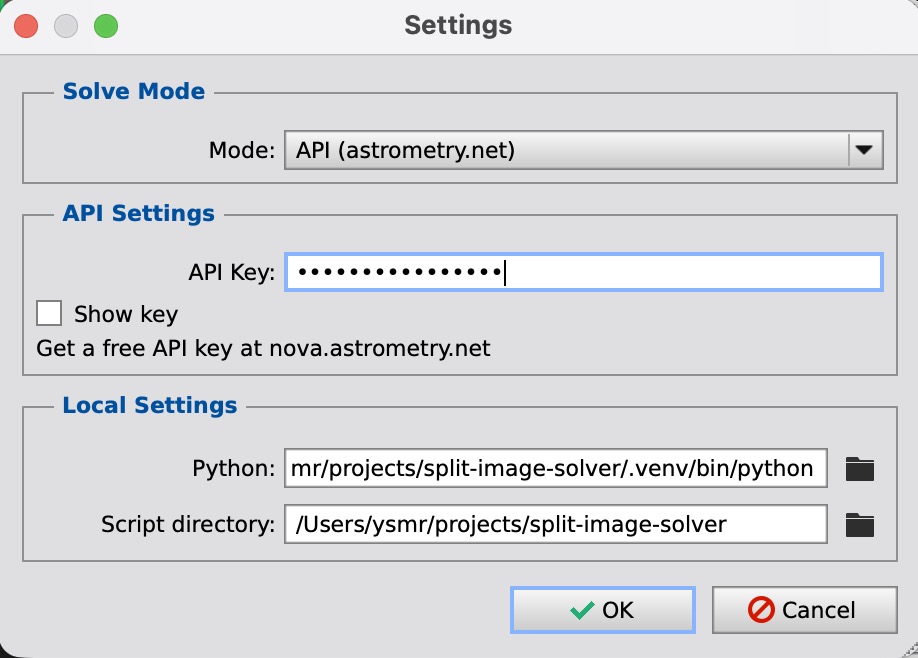
Opened via the “Settings…” button at bottom-left. Configure the solve mode (API / Local / ImageSolver), API key, and Python environment.
Features
- 3 solve modes: astrometry.net API (default), local solve-field (Python), ImageSolver (built-in PixInsight)
- Image preview + grid overlay: Real-time tile layout visualization with STF stretch (None/Linked/Unlinked)
- Flexible grid: 1x1 (single) to 12x8, with one-click “Recommended” button based on FOV
- Edge skip: Skip tile rows/columns on any side — useful for excluding foreground in landscape shots
- High accuracy: SIP distortion correction, WCSFitter control-point fitting
- Partial solve support: WCS can be integrated even if some tiles fail to solve
- 2-pass retry: Failed tiles are automatically retried using adjacent tile WCS as hints
- Overlap validation: Automatic WCS consistency check in overlapping regions between adjacent tiles
- Equipment DB: Auto-detect camera/lens from FITS headers, auto-fill focal length and pixel pitch
- Fisheye lens support: equisolid/equidistant/stereographic projections with per-tile scale correction
- Sesame object search: Auto-fill RA/DEC from object names
- SPFC compatible: Writes PCL:AstrometricSolution properties for use with SubframeSelector, SPCC, etc.
Solve Modes
| Mode | Description | Requirements | Accuracy | Split |
|---|---|---|---|---|
| API (default) | Solve via astrometry.net API | API key only (no Python) | Good | Supported |
| Local | Solve via local solve-field | Python + solve-field + star catalogs | Best | Supported |
| ImageSolver | Solve via PixInsight’s built-in ImageSolver | No additional setup | — | Single only |
Accuracy ranking: Local > API > ImageSolver. ImageSolver mode requires no API key or Python — the easiest way to get started for single-image solving.
Installation
From Repository (Recommended)
- Open PixInsight
- Go to Resources > Updates > Manage Repositories
- Add the following repository URL:
https://ysmrastro.github.io/pixinsight-scripts/ - Run Resources > Updates > Check for Updates
- Install SplitImageSolver
Manual Installation
- Clone or download the repository:
git clone https://github.com/ysmr3104/split-image-solver.git - Copy the following files from
javascript/to aSplitImageSolver/folder in your PixInsight scripts directory:SplitImageSolver.js/astrometry_api.js/wcs_math.js/wcs_keywords.js/equipment_data.jsh/imagesolver_bridge.jsh
- Restart PixInsight → run from Script > Astrometry > SplitImageSolver
Usage
Quick Start (Single Image Solve)
- Open the target image in PixInsight
- Run Script > Astrometry > SplitImageSolver
- Click Settings… to configure the solve mode and API key
- Leave Grid at 1x1 (Single) and click “Solve”
- WCS is applied to the image when complete
Split Solve (Wide-Angle Images)
- Select Camera/Lens (may be auto-detected from FITS headers)
- Click Recommended to set the optimal grid based on FOV
- For landscape shots, use Skip edges to exclude foreground (e.g., B:2 skips bottom 2 rows)
- Optionally enter an object name to retrieve RA/DEC via Sesame
- Click “Solve”
Parameters
| Parameter | Description |
|---|---|
| Camera / Lens | Camera/lens model (auto-fills pixel pitch and focal length) |
| Focal length | Focal length (mm) |
| Pixel pitch | Pixel pitch (μm) |
| Grid | Split grid (ColsxRows), 1x1 to 12x8 |
| Overlap | Tile overlap in pixels |
| Skip edges | Rows/columns to skip per side (T/B/L/R) |
| Object / RA / DEC | Object name (Sesame search) and center coordinates |
| Downsample / SIP Order | Downsample settings and SIP distortion order (API mode) |
Troubleshooting
- Solve takes too long / fails: Enter RA/DEC hints via Sesame search — this significantly speeds up solving. Also ensure focal length and pixel pitch are correct.
- Some tiles cannot be solved: Tiles containing foreground or clouds cannot be solved (expected behavior). WCS integration works as long as 2 or more tiles succeed. Pass 2 retry handles many failures automatically.
- Low WCS accuracy: Try increasing overlap, raising SIP Order, or using a finer grid. For applications requiring high peripheral accuracy, consider Manual Image Solver.
- Python not found in Local mode: Check that the Python path in Settings is correct.