Meteor Composer
A PixInsight script that detects meteors across a night of registered frames, lets you screen the candidates by eye, and composites the accepted ones onto a master light. Written entirely in PJSR — no Python, no external processes.
Finding the few dozen frames that caught a meteor among several hundred is what the detector takes over. The accept/reject decision always stays with you. Detection stops at proposing candidates; nothing is discarded automatically.
Example
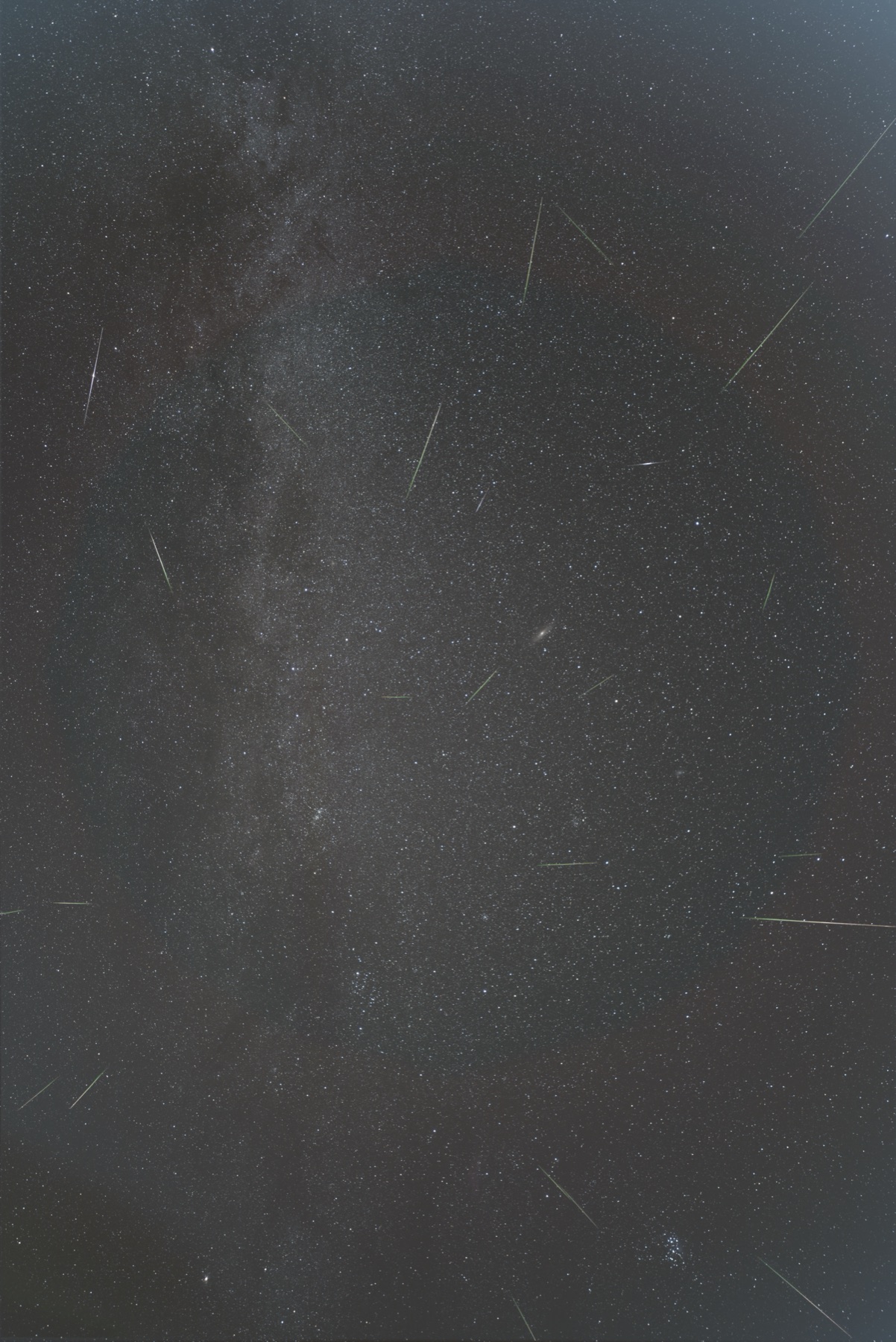
The Perseids on 12 August 2026. 31 meteors accepted out of 654 frames shot with an ILCE-7M3 at 13-second exposures.
Screenshots
Screening window
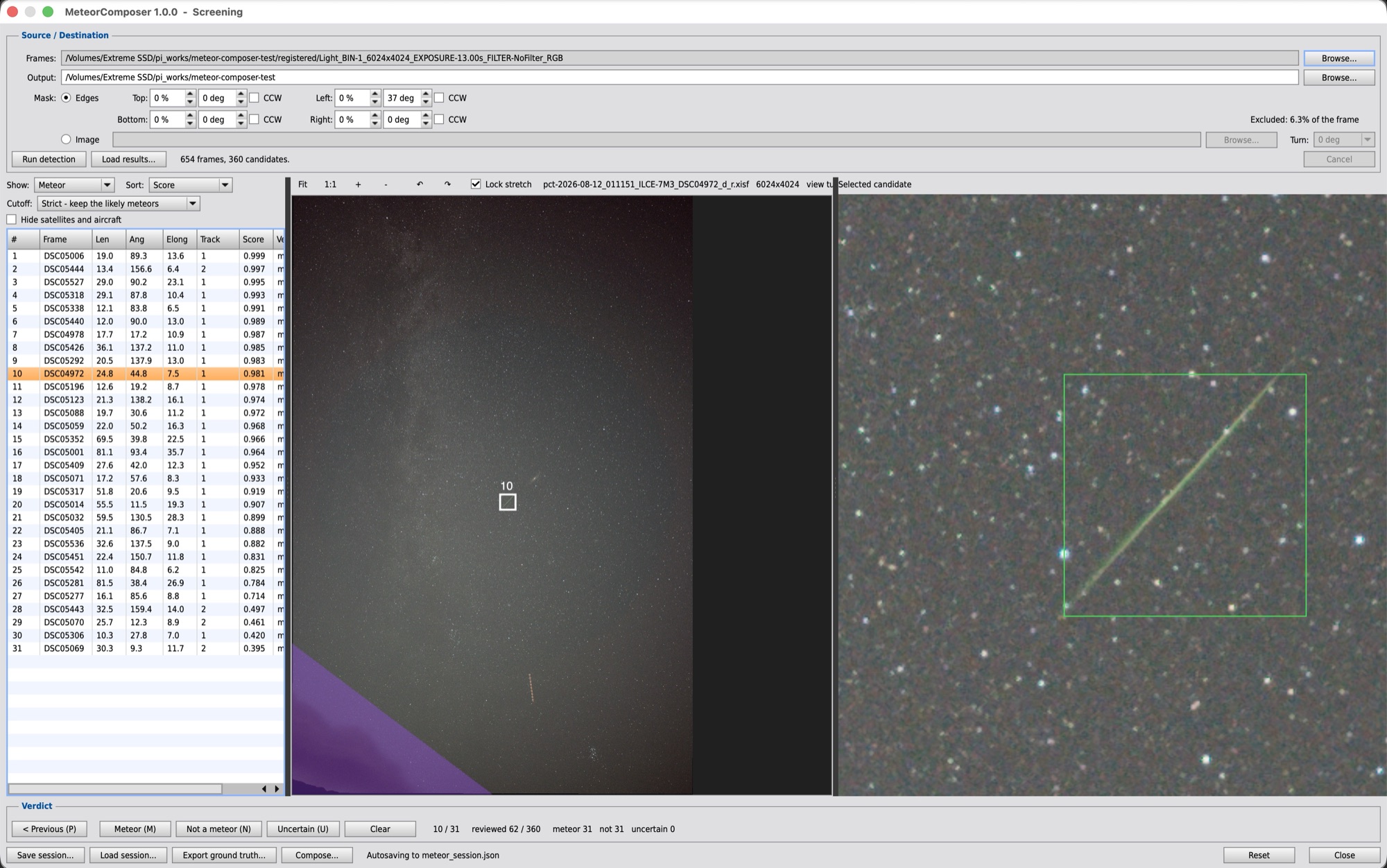
The candidate list is on the left, a full-frame preview in the centre, and the selected candidate at 1:1 on the right. Each candidate carries the length, angle, elongation, track length and score measured during detection, and the list can be sorted by score or by capture order. The purple region at the lower left is the exclusion mask — here a band tilted 37 degrees off the left edge, keeping the landscape out of detection.
The two preview panes answer different questions, and neither of them asks you to hunt for the candidate.
The right-hand pane is always centred on the selected candidate. Around it sits about 2.5 times the candidate’s own size of context, adjustable with the + and - buttons above the pane, and a thin rectangle marks the candidate itself so you can tell the detection from its surroundings. For a candidate near the edge of the frame the crop shifts rather than shrinks, so the magnification stays the same instead of jumping scale.
The centre pane keeps its own zoom, and while zoomed in it scrolls to follow the selection — but only when the candidate is not already on screen. Stepping through candidates that sit close together therefore does not shake the view. At Fit it never moves, since the whole frame is already visible.
Both previews share one stretch setting, on the toolbar above them: None shows the frame as it is, Linked stretches the three channels together and keeps their colour balance, Unlinked stretches each channel to its own histogram. Unlinked is the default because it brings out a faint trail against a coloured sky, and Linked is the one to switch to when you are judging a trail by its colour.
Verdicts are single keystrokes — M (meteor), N (not a meteor), U (uncertain) — and every verdict is saved as you make it.
Four stages
| Stage | What it does |
|---|---|
| 1. Detection | Scan every frame and build a list of meteor candidates |
| 2. Screening | Show the candidates with previews so you can accept or reject each one |
| 3. Mask generation | Build a trail mask for each accepted candidate from its light distribution |
| 4. Composition | Composite the meteors alone onto a master light |
Features
- Whole-night batch detection: scans every frame and enumerates candidates, at roughly 0.8 seconds per frame
- 1:1 previews for screening: a downscaled view cannot separate a meteor from a satellite, so the selected candidate is always shown at full resolution
- Verdicts saved as you go: written out on every keystroke, so nothing is lost by forgetting to save
- Satellite and aircraft suppression: objects that travel along the same path across several frames are matched up and can be hidden as a group
- Sorting and cutoffs: candidates are scored from length, elongation, trail colour and more. The default
Loosehides nothing - Exclusion regions: keep the landscape or a streetlight out of detection, either as per-edge depth and tilt, or as a painted image
- Fragment merging: when one trail is detected in pieces, collinear fragments are merged back into a single candidate
- Trail masks from measured light: the mask follows the actual spread of the trail’s light, so the composite leaves no seam in the background
- A frame that does not match the master is not composited silently: you are told what was measured and asked whether to leave it out, composite it anyway, or stop
- Fixed tripod switches coordinate system, not settings: a long fixed-tripod night runs from detection to composite without a single frame being aligned
- Interruptible: detection can be stopped at any point and keeps what it has found
Exclusion regions
Landscape and streetlights can be kept out of detection. The excluded region is drawn over the preview, and the measured excluded area is always shown.
Note that the area outside the registered frame — what the alignment pushed off the edge — is excluded automatically, so there is no need to paint over it. Painting a wide margin by hand costs you any meteor that fell inside it.
Reading the score
The Score column starts at 1.0 and is multiplied by one factor for each condition a candidate meets. It exists to put the likely ones first, not to state a probability, and none of it discards anything.
| Condition | Factor | What it is looking at |
|---|---|---|
| Appears in the same place with the same shape 4 or more times | × 0.02 | It never moves, so nothing flew past here — usually a star |
| Travels across 3 or more frames | × 0.15 | Longer than a meteor can last: a satellite or an aircraft |
| Runs along the border of the area with no data | × 0.02 | That border is a straight line, and this is it |
| Rank of the trail’s green fraction | × 0.30 – 1.00 | Meteors lean green, but not enough to decide alone |
- “Never moves” and “travels” are exclusive. Something that is not moving is not a satellite, and reporting it as one would be wrong
- The lowest possible score is 0.00012, so it never reaches zero. A candidate sorts to the bottom; it never leaves the list
- Length, elongation and brightness are not in the score. They decide what detection picks up in the first place; they are not used to rank what it picked up
- Colour is scored by rank within your own session, never against a fixed threshold — the distribution of green fraction moves with the camera, since a Bayer array has twice as many green photosites. The lowest rank only reaches 0.30, so a meteor that does not look green cannot be sunk by colour alone
Measured cutoffs
Measured over 654 frames: 411 candidates, 31 of them meteors.
| Cutoff | Meteors kept | Candidates left | Preset |
|---|---|---|---|
| 0.00 | 31 / 31 | 411 | Loose (default — hides nothing) |
| 0.05 | 31 / 31 | 369 | Standard |
| 0.20 | 31 / 31 | 116 | Strict |
| 0.40 | 31 / 31 | 100 | |
| 0.50 | 29 / 31 | 87 | ← meteors start being lost here |
The lowest-scoring meteor came out at 0.446. The presets sit well below it on purpose: a threshold read off one night’s data is fitted to that night.
Every candidate carries the reason it was scored down. Being asked to trust an ordering is worth nothing if you cannot check it.
Checking for yourself what it missed
“Meteors that never showed up as a candidate” can only be counted if you already know what you missed. There is a way round that.
Look at the pixel rejection map from integrating all your frames. A meteor appears in one frame only, so it is rejected, and it shows up in the rejection map as a streak. That map has nothing to do with this script and can be made before running it, which makes it an independent list to check the candidate list against.
- Integrate all the frames with ImageIntegration, with
Generate rejection mapsenabled - Count the meteor-like streaks in the rejection map
- Check whether MeteorComposer proposed the same ones
If you were going to integrate the night anyway, this costs almost nothing.
It is not a complete answer, though. In practice the rejection map carries a lot of satellite trails and a fair number of hot pixels, and a faint meteor will not necessarily stand out among them. Treat it as one more list to check the candidates against, not as the ground truth about what was missed.
Input data
Chosen with System in the dialog. What you are choosing is not how the frames were shot but which coordinate system the result comes out in.
- Sky-referenced — the input is the
registeredimages, aligned and debayered by WBPP. Tracked exposures on an equatorial mount, and fixed-tripod exposures short enough for StarAlignment to solve - Ground-referenced — the input is the
debayeredimages as they are. Nothing is aligned, at any stage. A fixed tripod only
A fixed tripod can use either. Short enough for the stars to stay points and sky-referenced works, which is all this script could do before 1.2.0. Shoot for longer and alignment stops solving, and sky-referenced stops being available.
Ground-referenced cannot be used with a tracked mount. It relies on the camera not having moved; track the sky and it is the landscape that moves between frames.
From 1.2.0 a fixed tripod is not treated as a harder alignment problem but as a different coordinate system.
Registering a short fixed-tripod sequence sky-referenced needs nothing special from StarAlignment. Short enough for the stars to stay round and the defaults solve it.
Whether exposures long enough to trail the stars can be registered at all is not known. Ground-referenced needs no registration at all, which is the other way out (below).
Sky-referenced and ground-referenced
Do you want the meteors in the right place among the stars, or in the right place against the landscape? Neither is more correct than the other. They answer different questions.
| Sky-referenced | Ground-referenced | |
|---|---|---|
| Detection reads | registered |
debayered |
| Background of the composite | the master light | one debayered frame, or a median of a few |
| Stars | points | one exposure’s worth of trail |
| Landscape | smeared into an arc on a long fixed-tripod night | sharp |
| Where the meteors land | correct against the stars — the radiant is visible | correct against the landscape — the picture as it looked |
| Alignment | required | not needed at all |
The right-hand column is what a fixed tripod is usually shot for. The tripod did not move, so a meteor left at the pixel it was recorded on is already in the right place against the ground. It is what you do by hand when you build a fixed-tripod meteor composite, and not one frame needs registering.
Stacking the background
A single frame as the background carries a single frame’s noise. The other option is a median of several frames, none of them aligned. The landscape stays sharp, the meteors, satellites and aircraft drop out of the median, and the noise falls. What it costs is the stars.
| Frames | Noise vs one frame | Sky rotation | Time |
|---|---|---|---|
| 5 | 0.59 | 0.23° | 3 s |
| 15 (default) | 0.37 | 0.82° | 25 s |
| 31 | 0.27 | 1.75° | 37 s |
It is off by default. How long a star trail belongs in the picture is a judgement about the picture, so do not read the default as a recommendation. The dialog shows the trail length worked out from your own frame interval.
The background is written out as <output name>_background.xisf, so you can look at it before compositing.
Measured results
Measured over 654 frames from 12 August 2026 (ILCE-7M3, 13-second exposures, 6024x4024).
| Candidates detected | 360 |
| Visually confirmed meteors recovered | 9 / 9 |
| Detection time | about 9 minutes (810 ms per frame) |
| Pixels changed outside the mask during composition | 0 |
Requirements
- PixInsight 1.9.4 or later (V8 engine only)
- No external dependencies — no Python, no third-party processes
PixInsight 1.9.3 and earlier (SpiderMonkey engine) are not supported.
Installation
From the repository (recommended)
- Open PixInsight
- Open Resources > Updates > Manage Repositories
- Add this repository URL:
https://ysmrastro.github.io/pixinsight-scripts/ - Run Resources > Updates > Check for Updates
- Install MeteorComposer and restart PixInsight
Manual installation
- Clone or download the repository:
git clone https://github.com/ysmr3104/meteor-composer.git - Copy every file in
javascript/into aMeteorComposer/folder in your PixInsight scripts directory - Restart PixInsight
Once installed, launch it from Script > Image Analysis > MeteorComposer or Script > ysmrastro > MeteorComposer.
Usage
- Choose System: Sky-referenced for tracked frames, Ground-referenced for a fixed tripod
- Point Frames at the directory of frames —
registeredfor sky-referenced,debayeredfor ground-referenced. The first one appears in the preview - Set Output. Detection results, verdicts and the composite all go here — nothing is ever written to the input directory
- Use Mask to exclude the landscape if you need to
- Run Run detection
- Judge the candidates one at a time (
Mmeteor /Nnot a meteor /Uuncertain) - Use Compose… to pick the background and build the composite — the master light when sky-referenced, one of the
debayeredframes (the middle of the night by default) when ground-referenced
System locks once there are detection results. Detection, screening and compositing all have to happen in one coordinate system; switching part way would leave candidates found in one about to be composited in the other. Reset unlocks it.
You can stop part way through screening and pick up again with Load session….
Troubleshooting
- Too many candidates: tick
Hide satellites and aircraftand raiseCutofftoStandardorStrict. Tightening the cutoff does raise the chance of missing a meteor, so it is worth going throughLooseonce first - A meteor never appears as a candidate: check that the exclusion mask is not too wide. The excluded area is reported to the console when
Run detectionstarts - The area around a composited meteor looks wrong: trail masks are built from the light distribution, so a meteor that spanned an exposure boundary (recorded across two consecutive frames) can leave a seam
- A warning appears when I choose ground-referenced: the directory’s own name disagrees with the choice. Using
registeredframes for a ground-referenced composite draws the landscape as an arc; usingdebayeredframes for a sky-referenced one places the meteors by pixel rather than by where they were among the stars. It is a warning, not a refusal — carry on if this really is the directory you meant - I want to use an edited image as the ground-referenced background: it has to be linear. The composite matches the frame’s brightness to the background across the sky pixels, and a stretched file breaks that. A master light integrated without registering the frames is linear and can be used
- A frame was left out of the composite: the message says what was measured about it.
x% of this frame has no datameans alignment pushed that much of it off the frame, which happens at the beginning and end of a long session.only n of its detail lines upmeans the frame and the master are at the same brightness but do not show the same sky — the usual cause is one of the two not having been debayered.n times dimmer than the mastermeans exactly that. Whichever it is, you are asked whether to leave it out, composite it anyway, or stop, and the answer covers the rest of the run - Detection is slow: I/O dominates. Keep the registered frames on an SSD
License
Support
These scripts are free to use. If you would like to support their continued development, you can do so via GitHub Sponsors.